
Quickstart Guide
This guide walks you through setting up and using GRIPLOCK for the first time.Prerequisites
Before you begin, ensure you have:1
GRIPLOCK-Compatible NFC Card
Any NFC card with a unique UID (ISO 14443A/B compliant). This includes most modern contactless cards.
2
GRIPLOCK Mobile App
Available for iOS and Android. The app reads NFC cards and establishes secure connections.
3
Modern Web Browser
Chrome, Firefox, Safari, or Edge with WebRTC support enabled.
First-Time Setup
Step 1: Access the Dashboard
Navigate to the GRIPLOCK dashboard in your web browser:- A compressed WebRTC offer
- The dashboard’s public key for encryption
- A unique session identifier
- WebSocket signaling server URL
Step 2: Scan with Mobile App
- iOS
- Android
- Open the GRIPLOCK app
- Tap Scan QR Code
- Point your camera at the dashboard QR code
- The app will parse the connection details automatically
Step 3: Tap Your NFC Card
Once connected, the app will prompt you to tap your NFC card:- Hold your NFC card against the back of your phone
- Wait for the “Card Detected” confirmation
- The app reads the card’s unique identifier (UID)
Step 4: Enter Your PIN
After card detection, enter your personal PIN:Choose a strong PIN. Your PIN is never stored anywhere—you must remember it. If you forget your PIN, you’ll need to create a new wallet with a new PIN.
Step 5: Access Your Wallet
Upon successful authentication, the dashboard displays:- Solana Address — Your deterministically derived wallet address
- SOL Balance — Current balance in SOL
- Token Holdings — SPL tokens held in the wallet
- Transaction History — Recent on-chain activity
Understanding the Dashboard
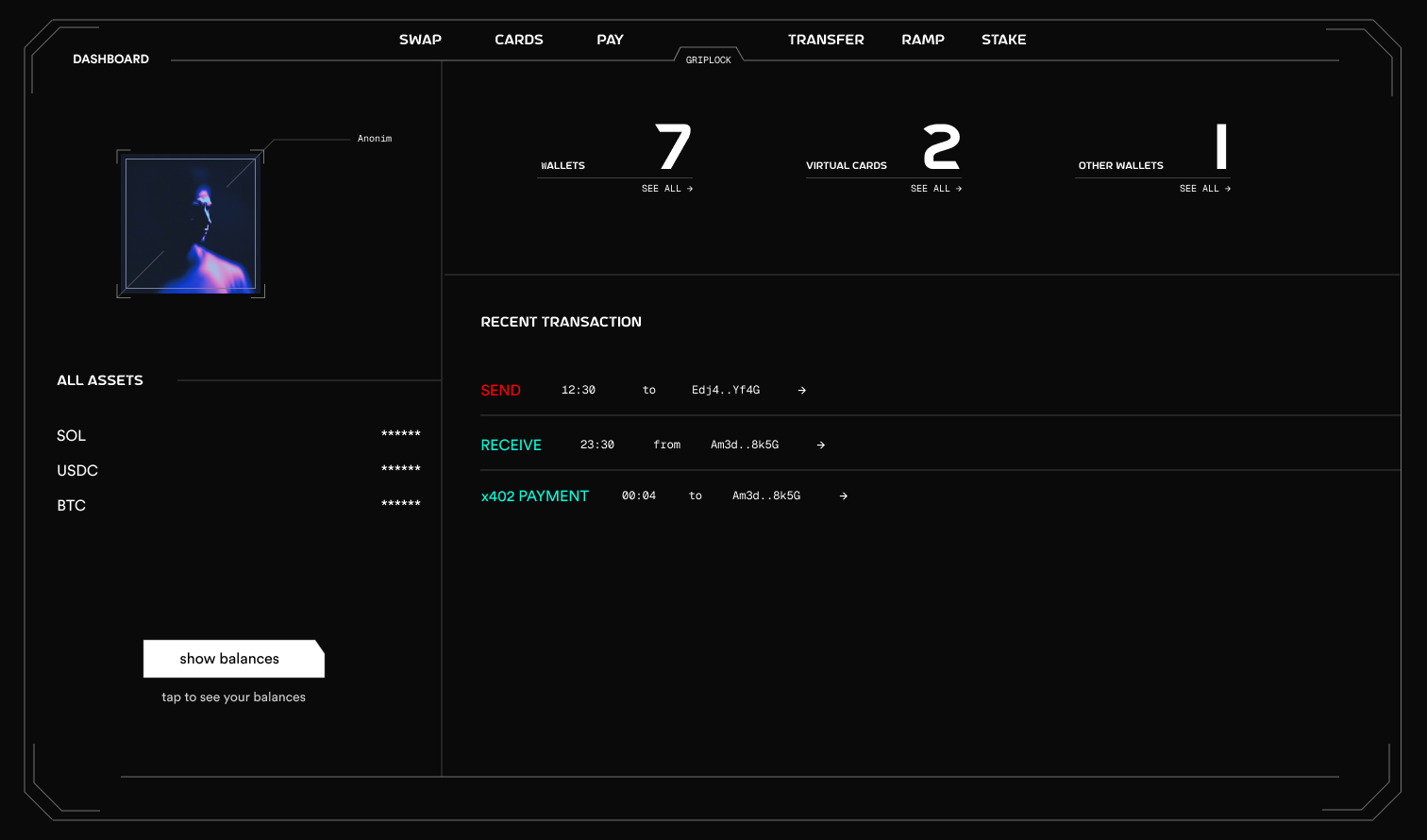
Navigation Bar
| Menu | Function |
|---|---|
| SWAP | Token-to-token swaps via DEX aggregators |
| CARDS | Virtual Visa card management, Apple Pay & Google Pay |
| PAY | Payment links, QR payments, request money |
| TRANSFER | Send and receive crypto globally |
| RAMP | Buy crypto (on-ramp) and cash out (off-ramp) via Moonpay |
| STAKE | SOL staking with auto-compound yields |
| MICROPAY | x402 protocol micropayments for APIs and AI agents |
| PRIVACY | Zero-knowledge KYC verification and stealth mode settings |
Sidebar Panel
| Section | Description |
|---|---|
| Profile | Your masked wallet address with copy functionality |
| Balance | Current SOL balance (tap to show/hide) |
| Assets | List of SPL tokens with balances |
Main Panel
| Section | Description |
|---|---|
| Stats Cards | Quick overview of wallets, virtual cards, and connected wallets |
| Transactions | Recent activity including sends, receives, and x402 payments |
Session Management
GRIPLOCK sessions are designed for security:15-Minute Timeout
Sessions expire after 15 minutes of inactivity
Activity Detection
Mouse movement, clicks, scrolling, and keyboard input reset the timer
Encrypted Storage
Session data is AES-256-GCM encrypted in browser storage
Manual Logout
Click the logout button to immediately terminate the session
Session Persistence
Your session persists across page refreshes, but credentials are:- Encrypted with a session-derived key
- Stored with an expiration timestamp
- Automatically cleared when expired
Next Steps
Architecture Overview
Understand how GRIPLOCK components interact
Security Deep Dive
Learn about the cryptographic foundations
Troubleshooting
QR Code Not Scanning
QR Code Not Scanning
Ensure adequate lighting and hold your phone steady. The QR code contains compressed data and requires a clear capture.
NFC Card Not Detected
NFC Card Not Detected
- Check that NFC is enabled on your device
- Remove any phone case that may block NFC
- Try positioning the card at different angles
- Some phones have NFC sensors at specific locations
Connection Failed
Connection Failed
- Verify both devices have internet connectivity
- Check that WebRTC is not blocked by firewall
- Try refreshing the dashboard for a new QR code
Session Expired Unexpectedly
Session Expired Unexpectedly
Sessions expire after 15 minutes of inactivity. Any user interaction resets this timer. If sessions expire too quickly, ensure you’re actively using the dashboard.